AI
What Families Should Know
At Avon Lake City Schools, we are committed to helping students learn and grow in a safe, responsible, and supportive digital environment. As artificial intelligence (AI) becomes more common in educational tools and online platforms, we want families to understand how AI may be used in our schools, how students are protected, and what expectations guide its use.
What is artificial intelligence
Artificial intelligence, or AI, refers to computer systems that can recognize patterns, generate responses, and complete tasks that usually require human thinking. AI is already built into many digital tools, including search engines, writing supports, learning programs, and online help features.
Why is it important
AI isn’t a future concept—it’s already built into the tools and careers students will encounter after graduation; such as agriculture (precision farming), construction (project planning and safety monitoring), healthcare, cybersecurity, data analysis, engineering, education, finance (fraud detection), manufacturing, software development, logistics and trucking (route optimization), marketing (customer insights), and even creative fields like graphic design and video production. Employers expect employees to understand how to use AI tools to solve problems, analyze information, and work more efficiently. For example, doctors and nurses use AI to help interpret medical data and improve patient care; skilled tradespeople use AI-powered diagnostics in automotive and HVAC systems; and office professionals rely on AI to draft communications, analyze spreadsheets, and manage workflows. Teaching students how to use AI responsibly helps them understand both its benefits and its limitations and become more effective thinkers preparing them to enter a workforce.
How our district approaches AI
Our district believes that technology should support learning while keeping people at the center of education. Teachers, staff, families, and trusted adults remain the primary support system for students. AI may be used as a tool to assist with learning, feedback, accessibility, and instructional support, but it should never replace human judgment, relationships, or care.
We also do not support the use of AI tools that act like friends, companions, or emotional support for students. Why are we cautious about AI companions and chatbots?
- Reduced social skills & resilience — Bots don’t challenge students or model conflict resolution.
- Emotional dependency — Always available “friendly” bots can increase isolation.
- Misinformation & unsafe advice — Bots may give incorrect, biased, or harmful answers.
- Delayed real help — Students might rely on bots when they should talk to counselors or trusted adults.
- Privacy concerns — Conversations may be stored or shared.
- Exposure to unsafe content — Some AI systems can generate inappropriate responses.
- Manipulation & commercial influence — Some systems may push products or viewpoints.
- Academic integrity issues — Overuse can reduce critical thinking and skill development.
Adolescence and childhood are important times for students to develop healthy relationships, communication skills, and resilience through real human interaction. Our focus is on using AI as an instructional tool, not as a substitute for personal connection or professional support.
How AI may be used in school
Students may not use AI tools to complete schoolwork unless a teacher has specifically given permission. When AI use is allowed for a class activity or assignment, students may be required to
identify how the tool was used and cite AI-generated content according to teacher directions. Unauthorized use of AI for schoolwork may be treated as academic dishonesty under the Student Code
of Conduct.
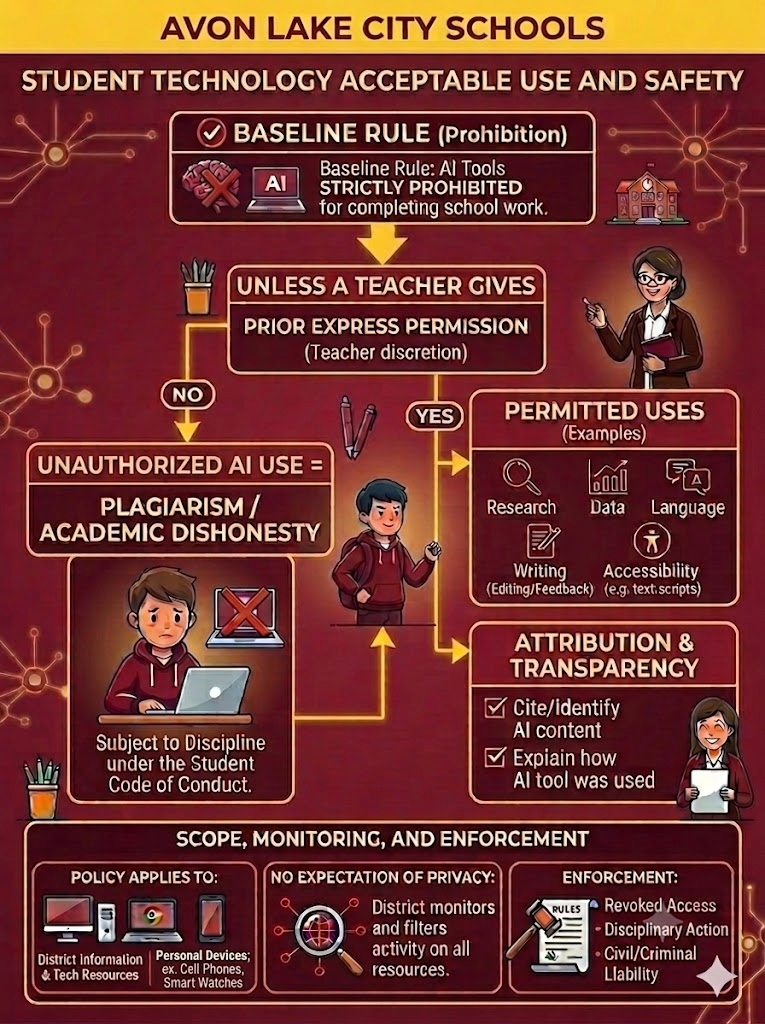
Main Heading: Avon Lake City Schools – Student Technology Acceptable Use and Safety
Section 1: The AI Use Decision Workflow
This section is organized as a flowchart starting from a central rule.
Step 1: Baseline Rule (Prohibition)
- Rule: AI tools are strictly prohibited for completing school work.
- Visual Note: An icon shows a brain and a laptop with a red "X" through them.
Step 2: The Exception (The Permission Gate)
- Condition: Unless a teacher gives prior express permission.
- Note: Instructors have full discretion.
Path A: "NO" (Permission Not Granted)
- Consequence: Unauthorized AI use is classified as Plagiarism or Academic Dishonesty.
- Warning: The student is subject to discipline under the Student Code of Conduct.
- Visual Note: An illustration shows a saddened student at a laptop with a red "X" over the screen.
Path B: "YES" (Permission Granted)
- Action: Proceed to Permitted Uses and Attribution.
Section 2: Requirements for Approved Use
If a teacher grants permission, the following two boxes apply:
- Box 1: Permitted Uses (Examples)
- Research Assistance
- Data Analysis
- Language Translation
- Writing Assistance (Editing and Feedback)
- Accessibility Supports (e.g., text-to-speech, transcripts)
- Box 2: Attribution & Transparency
- Requirement 1: Cite and identify all AI-generated content.
- Requirement 2: Explain how the AI tool was used in the process.
Section 3: Scope, Monitoring, and Enforcement
This footer section covers the legal and technical boundaries of the policy.
- Policy Applies To:
- District Information and Tech Resources.
- Personal Devices when on the district network or used for district purposes.
- No Expectation of Privacy:
- The District monitors and filters activity on all resources, including personal devices used for district work.
- Enforcement:
- Revoked Access
- Disciplinary Action
- Civil or Criminal Liability
- Visual Note: An icon of a judge’s gavel next to a "Rules" document.
End of Description.
When appropriate, AI-supported tools may be used to enhance teaching and learning. Examples
may include:
- instructional software that helps students practice skills,
- tools that support accessibility, such as text-to-speech or translation,
- programs that help teachers organize information, provide feedback, or review student progress,
- digital platforms that use AI features to personalize learning experiences.
Teachers may also choose to use approved instructional resources and strategies that best meet the needs of their students while staying aligned with district expectations and board policy.
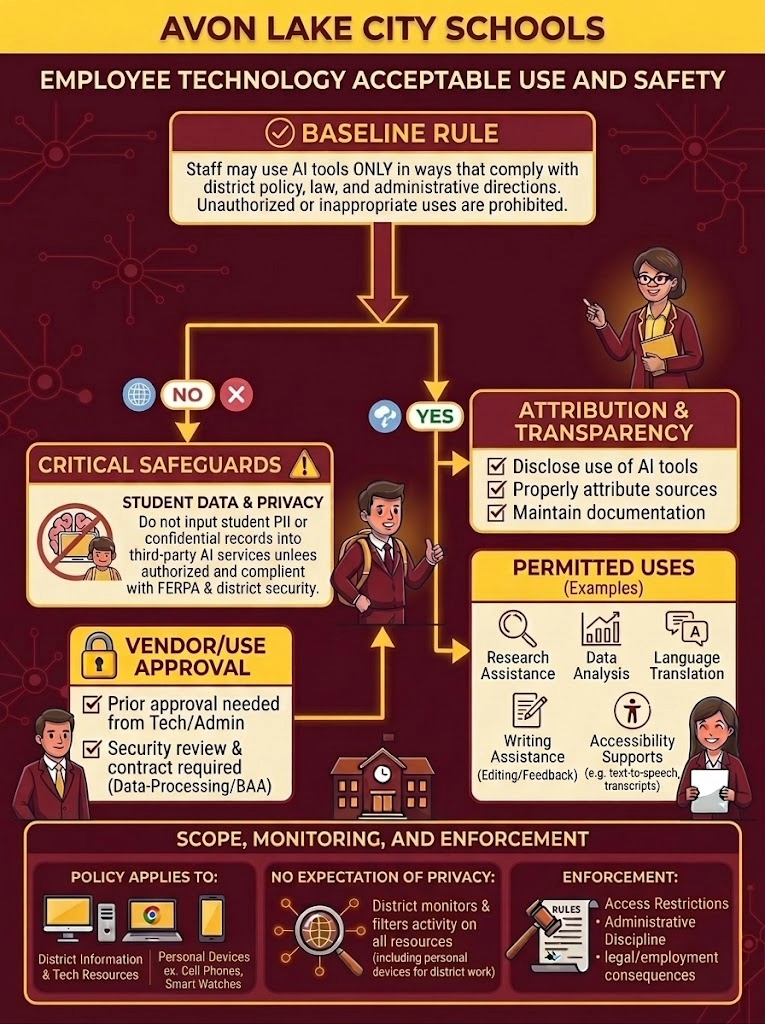
Main Heading: Avon Lake City Schools – Employee Technology Acceptable Use and Safety
Section 1: The Core AI Policy Workflow
This section outlines the primary rule and the required secondary approvals.
Step 1: Baseline Rule
- Rule: Staff may use AI tools ONLY in ways that comply with district policy, law, and administrative directions. Unauthorized or inappropriate uses are prohibited.
Step 2: The Decision Gate
- The workflow splits based on whether the specific tool or use case is already authorized.
Path A: "NO" (Requires Critical Safeguards & Approval)
- Box 1: Critical Safeguards (Student Data & Privacy)
- Warning: Do not input student PII (Personally Identifiable Information)
or confidential records into third-party AI services unless authorized and
compliant with FERPA and district security.
- Warning: Do not input student PII (Personally Identifiable Information)
- Box 2: Vendor/Use Approval
- Requirement 1: Prior approval is needed from Tech/Administration.
- Requirement 2: Security review and contract are required (Data-Processing/BAA).
Path B: "YES" (Permitted and Transparent Use)
- When a tool is authorized, the employee must follow the guidelines in the next
section.
Section 2: Requirements for Authorized Use
This section details the operational standards for using AI tools.
Box 1: Attribution & Transparency
- Disclose the use of AI tools.
- Properly attribute sources.
- Maintain documentation of the AI’s involvement.
Box 2: Permitted Uses (Examples)
- Research Assistance
- Data Analysis
- Language Translation
- Writing Assistance (Editing and Feedback)
- Accessibility Supports (e.g., text-to-speech, transcripts)
Section 3: Scope, Monitoring, and Enforcement
The footer section details the legal and technical boundaries of the policy.
Policy Applies To:
- District Information and Tech Resources.
- Personal Devices when used on the district network or for district purposes.
No Expectation of Privacy:
- The District monitors and filters activity on all resources, including personal devices used for district work.
Enforcement:
- Access Restrictions
- Administrative Discipline
- Legal and Employment Consequences
End of Description.
How students are protected
Student safety, privacy, and responsible technology use are priorities in Avon Lake City Schools. The district uses multiple layers of protection to support safe online access for students, including filtering, monitoring, approved vendor agreements, and device management tools. Student devices are organized by grade level and are subject to different web filtering and app access settings. These protections apply when students use their school-issued accounts and devices, even when they are not at school.
The district also works only with vendors that have agreed to require student data privacy protections. Families can review the district’s approved vendor list and related privacy agreements on
the Student Data Privacy Consortium website.
Digital citizenship and student learning
Because AI is becoming part of the digital world students live in, we believe it is important to help students learn how to use technology thoughtfully and responsibly. This includes teaching students:
- that AI can make mistakes,
- how to question and verify information,
- how to protect privacy,
- when to seek help from a teacher or trusted adult,
- and how to use digital tools in safe, respectful, and academically honest ways.
We also provide ongoing learning opportunities for staff so they can stay informed about emerging technologies and use appropriate tools in ways that support instruction and student well-being.
Monitoring and safety
To help maintain a safe school technology environment, the district uses tools such as Lightspeed Filter and Lightspeed Classroom. These tools help manage content access, support instructional focus, and allow staff to supervise the use of district-managed devices during learning activities. The district continually updates filtering and monitoring practices to respond to new websites, apps, and online content.
Student data privacy and SB 29
Avon Lake City Schools takes student data privacy seriously. In compliance with Ohio Senate Bill 29, the district provides families with notice regarding the monitoring of school-issued devices and the sharing of student data with approved educational technology providers. This includes information about the types of monitoring that may occur on district-issued devices, the use of approved vendors, and annual parent notification requirements.
Board policies and resources
Our district’s use of technology and AI is guided by board policies (PO7540.09, PO7540.03, PO5136, PO5500, and PO7544) related to student technology use, employee technology use, student conduct, student privacy, and digital safety. These policies help ensure that technology is used in ways that support learning, protect students, and reflect legal and ethical expectations. For more information, families may review the approved vendor and student data privacy information, and board policies related to technology use and digital safety.
Questions about district-issued devices
Families who do not want their child to use a district-issued Chromebook may contact their child’s school or media center to discuss available options. When a device is needed for instruction, the school will work with families to determine appropriate accommodations.
Our commitment
As technology continues to evolve, Avon Lake City Schools will continue to review and refine its practices to ensure that AI and other digital tools are used in safe, responsible, and educationally appropriate ways. Our goal is to prepare students for a technology-rich world while keeping learning human-centered, secure, and grounded in strong relationships.